
Automated Contract Monitoring with Power Automate & Xurrent – Always Stay on Top of Your Deadlines
10.06.2025
IT Risk Management – Fundamentals, Benefits and Implementation with Xurrent
In times of growing digital dependencies and increasing cyber threats, IT risk management is becoming a central management tool for companies. The ability to identify, assess and manage risks early on is crucial for the resilience and future viability of modern organizations. This is not only about security incidents, but also about business interruptions, regulatory requirements and technological change.
This article highlights the relevance of IT risk management, explains typical process steps including key terms, and shows how this process can be mapped digitally, efficiently and practically using a service management system – specifically Xurrent, based on 4me.
1. Why is IT risk management important?
Modern IT systems are the backbone of many business processes. Today, an outage, a security vulnerability or a misconfiguration can quickly lead to financial losses, reputational damage or legal consequences. At the same time, requirements from laws, standards and customers are rising: companies must be able to demonstrate that they actively address their risks and take appropriate measures.
Effective IT risk management helps address these challenges systematically. It creates transparency about potential threats, assesses their impact and ensures that risks are not ignored but handled in a controlled way. It also supports management in making well-founded decisions – based on traceable analyses rather than gut feeling.
2. What does the process typically look like?
In practice, IT risk management follows a standardized process that can be divided into five core phases: identification, assessment, treatment, monitoring and communication. Each of these steps helps capture risks in a structured way and manage them in a targeted manner.
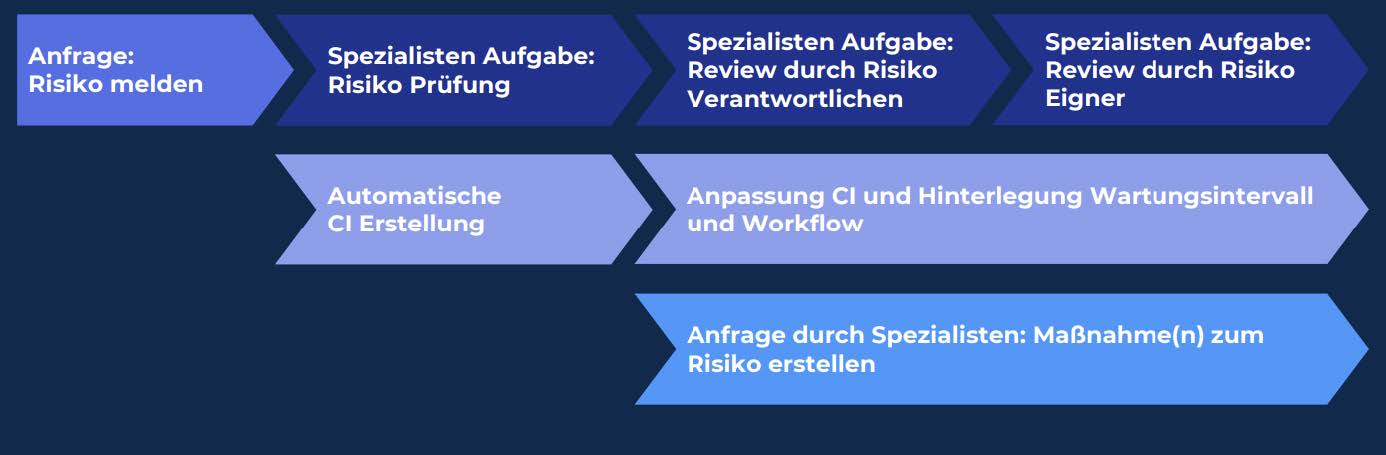
Figure 1: The risk process mapped in Xurrent
a) Risk identification
The first step is to recognize risks. In an IT context, a risk is a potential negative deviation from a target objective – for example due to a data leak, a hardware failure or an external attack. Note that not every problem is automatically a risk: there must always be a combination of a threat and a vulnerability that can trigger an undesirable event.
Typical sources for risk identification include vulnerability analyses, internal audits, reports from employees, external events and legal requirements.
b) Risk assessment
Each identified risk is then assessed. Two factors are the focus:
- Probability of occurrence: How likely is it that the risk will actually materialize? This is usually assessed qualitatively (e.g. low / medium / high) or quantitatively (e.g. as a percentage).
- Impact (extent of damage): What damage would occur in the worst case – financial, reputational or operational?
Both factors are visualized in a risk matrix and together result in a risk score or risk level. This serves as the basis for decisions on measures.
Key terms in this context:
- Risk appetite: Risk appetite describes the maximum level of risk a company is willing to take on deliberately in order to achieve its objectives. Risks above this tolerance range must be treated.
- Residual risk: Even after measures have been implemented, a residual risk usually remains – it must be assessed and, if necessary, accepted.
c) Risk treatment / recording measures
Appropriate measures must be defined for each risk. There are four basic strategies:
- Avoidance (e.g. by canceling a risky project)
- Reduction (e.g. through technical or organizational safeguards)
- Transfer (e.g. through insurance or outsourcing)
- Acceptance (e.g. if the risk is within the risk appetite)
These measures must be planned, implemented and documented.
d) Monitoring and review
Risk management is not a one-time act but a continuous process. Risks and their assessments must be reviewed and updated regularly – for example after technical changes, after incidents or as part of annual reviews. This is the only way to keep the risk picture current and actionable.
e) Documentation and communication
All steps of risk management should be documented in a traceable way. This is important for internal transparency, for external audits (e.g. ISO 27001, BSI IT-Grundschutz) and for the traceability of decisions.
3. What are the benefits of using a service management system?
Managing risks manually – for example with Excel lists or uncoordinated emails – is error-prone, time-consuming and difficult to scale. An integrated service management system such as Xurrent (based on the 4me platform) offers a professional solution.
Benefits at a glance:
- Standardized templates for recording risks ensure that all relevant information is captured completely and consistently.
- Predefined workflows automatically route the process to the responsible roles (e.g. risk responsible, manager, measure owner).
- Agile boards and dashboards visualize open risks, processing status and priority – for better oversight and control.
- Linking risks to measures and tasks ensures that problems are not only identified but also actively addressed.
- Audit-proof documentation of all steps, changes and assessments can be accessed and verified at any time.
Such a system not only takes the load off IT, but also brings security and transparency to the entire organization.
4. How can I map this process in Xurrent?
In Xurrent, IT risk management is implemented in a fully digital and structured way. Dedicated requests, automated workflows and configuration items (CIs) are used to ensure end-to-end traceability and audit-proof processing.
Key components of Xurrent risk management
The system has its own “Risk Management” service area containing two standardized request types:
- “Report risk” – for the structured recording of a new risk
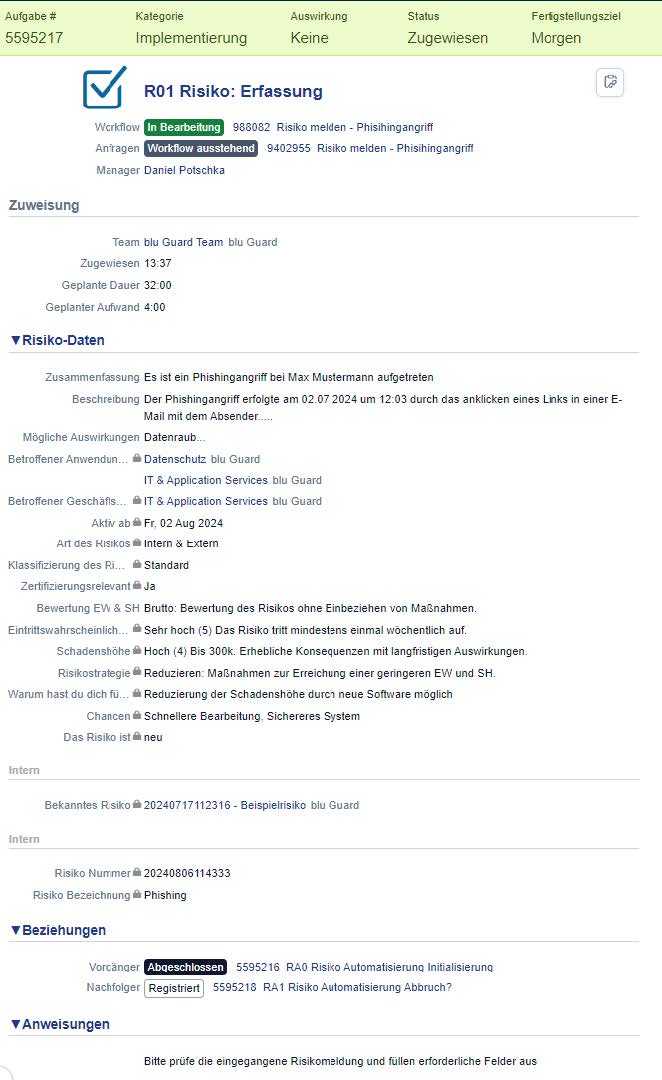
Figure 2: Review of a recorded risk relating to phishing attacks
2. “Record measure(s) for a risk” – for documenting specific countermeasures that are linked to existing risks
These requests contain defined mandatory and selection fields, for example for description, affected areas, classification, probability of occurrence (PO), extent of damage (ED) and risk strategy. The risk matrix is automatically calculated from PO and ED and visualized.
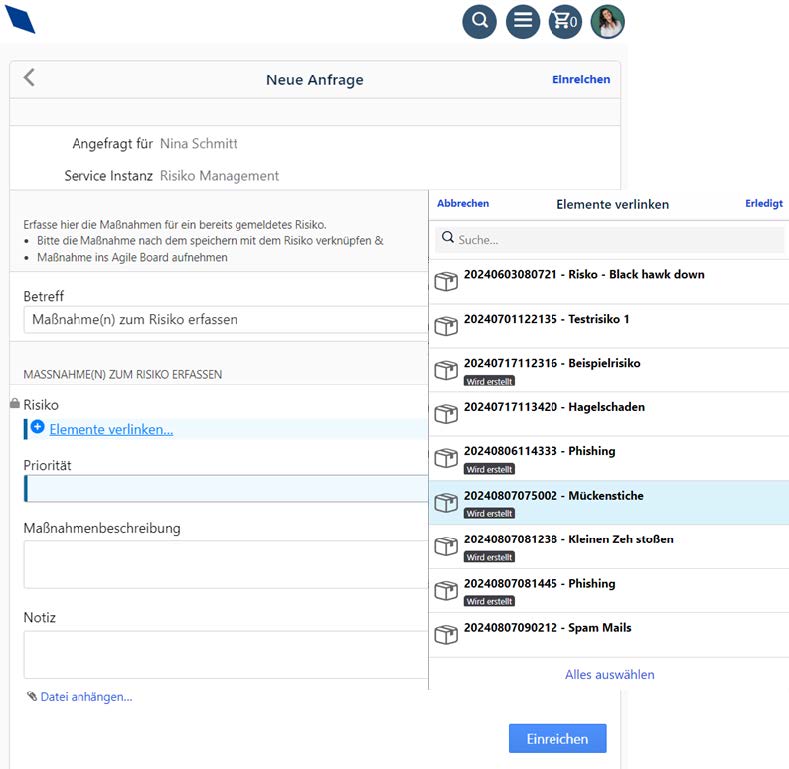
Figure 3: Recording measures for risks
Workflow sequence: from risk entry to measure
As soon as the “Report risk” request is submitted, a multi-step workflow starts with the following tasks:
- Risk review by a specialist > Review and, if necessary, completion of the information > Creation of a configuration item (CI) for the risk > Optional creation of measure requests > If no CI is created, the task is reopened
- Review by the risk responsible > Review and approval in the CI > Measures can be added > Changes only possible in the CI from this point on
- Review by the risk owner > Final check of the information > Measures should be created at this stage at the latest > The CI is maintained permanently in the system
Each of these tasks automatically appears in the inbox of the assigned person and can also be moved to an agile board.
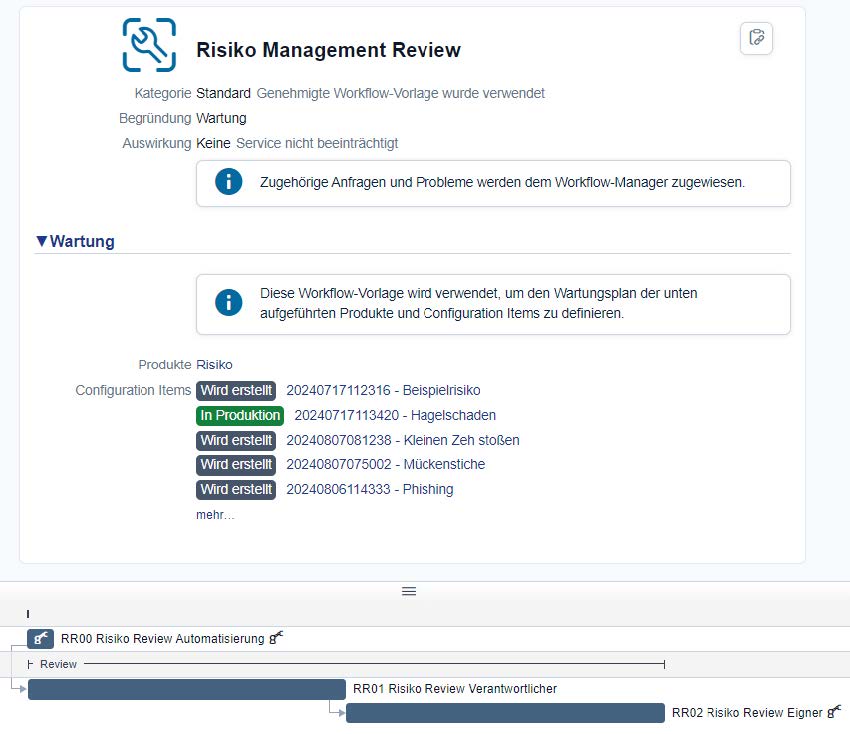
Figure 4: Workflow-based management review of risks
Configuration item (CI) – the central control element
Once successfully created, each risk is maintained as a separate CI (configuration item). The CI contains all information relevant to the assessment and is subject to its own automated maintenance workflow. This workflow repeats at defined intervals and includes regular reviews by the risk responsible and the risk owner.
Measure management
Measures are documented in a separate request type. Each measure is linked to one or more risk CIs. The measure request is visible only to specialized roles and supports targeted linking to existing risks.
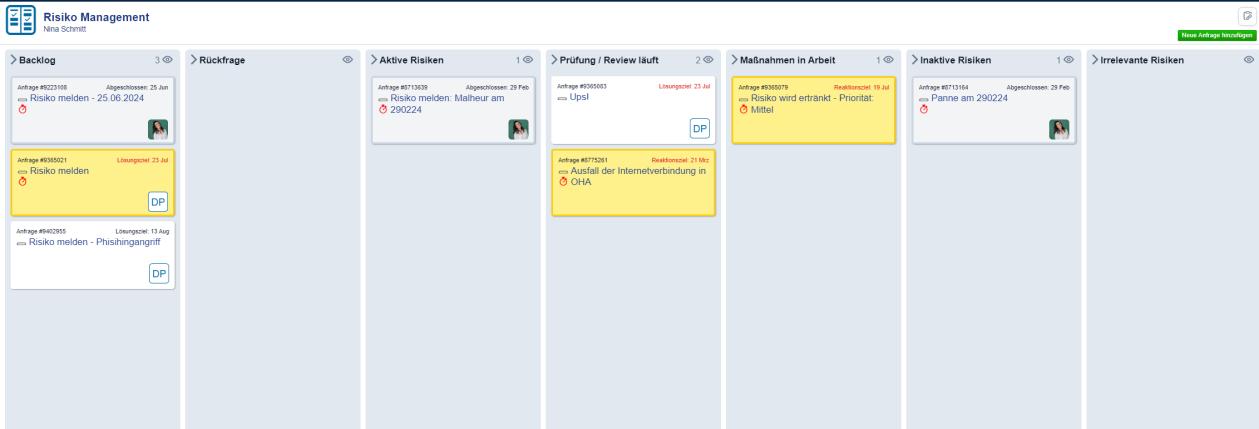
Figure 5: Kanban board for tracking risks and measures in Xurrent
Visualization & reporting
All tasks and risks can optionally be integrated into an agile board. The status of all requests, measures and workflows can also be analyzed via the integrated reporting dashboard. This gives the risk management team full transparency into the current status and potential bottlenecks at all times.
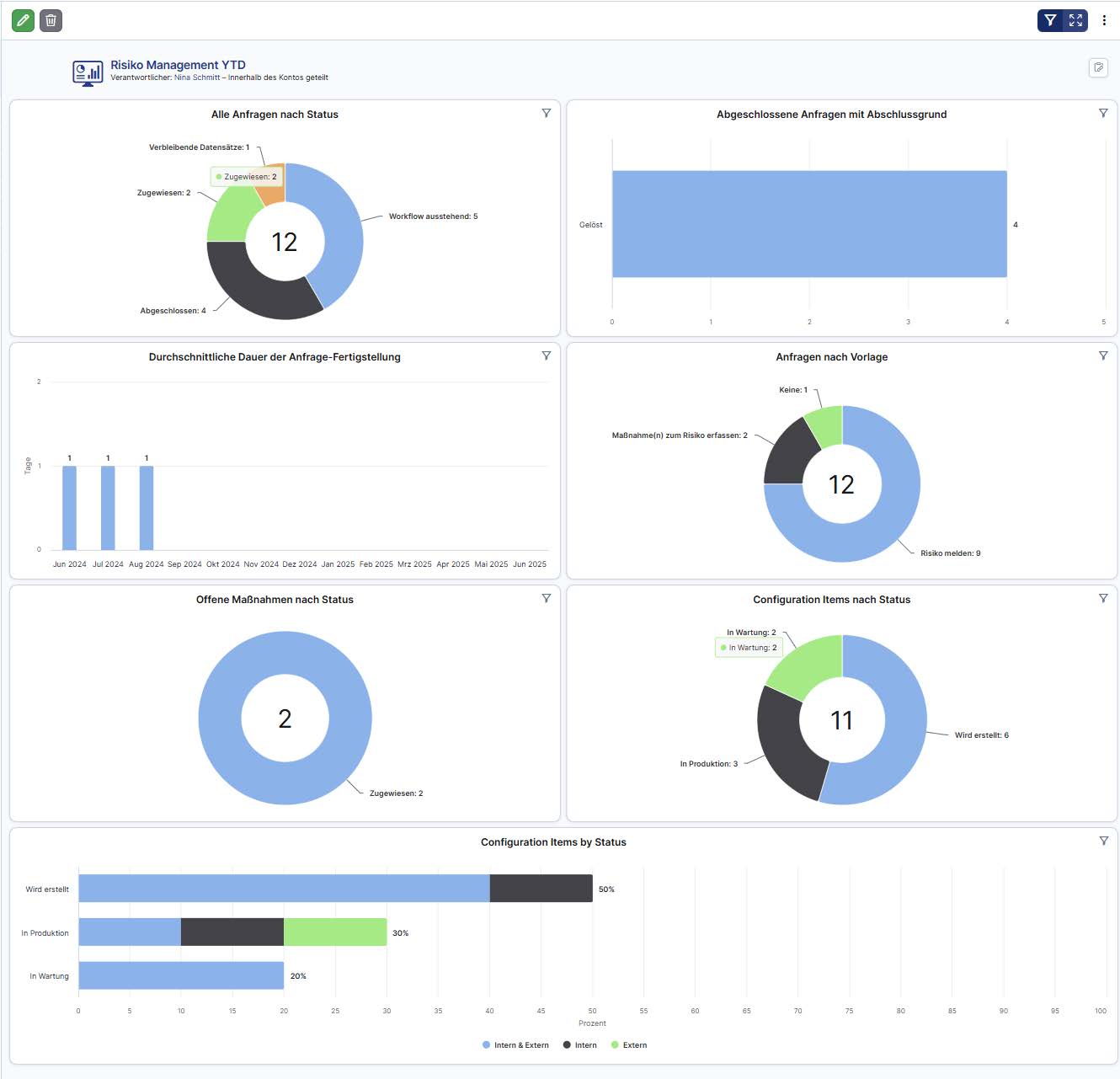
Figure 6: Risk management dashboard in Xurrent
Xurrent offers a fully integrated solution for implementing IT risk management – from structured requests and automated reviews to ongoing maintenance and tracking of measures. The use of CIs, workflows, dashboards and specialized roles ensures a high level of process reliability and maximum transparency.
5. Support from blu Systems GmbH
blu Systems GmbH provides comprehensive support to companies in introducing, optimizing and operating IT risk management processes. Our team of experienced consultants offers individual advice and hands-on support – from designing suitable risk strategies and integrating them into existing service management landscapes to configuring Xurrent and 4me workflows.
We help you with:
- defining and modeling your risk processes,
- setting up and customizing request templates and workflows in Xurrent,
- training your process owners,
- and continuous optimization based on audits and reviews.
Whether for ISO 27001, BSI IT-Grundschutz or industry-specific requirements such as KRITIS (Germany's critical infrastructure regulations) – we provide targeted support in protecting your information assets. Get in touch with us – together we'll make your risk management future-proof.
Download the flyer here: